Frappe PMM

Development


On this page
Last updated on 24th March, 2026
Development
Developer Expert Training
MONTH-WISE TRAINING SUMMARY.
Month
Focus Area
Duration
Key Outcomes
Focus Area
Technical Foundation
Duration
Weeks 1–4
Key Outcomes
- Dev environment ready: Ubuntu, Bench, MariaDB, Redis, VS Code
- Custom app scaffolded and installed on local bench
- DocTypes built via UI and code (.json + .py)
- All field types, naming series, and property setters understood
- Controller lifecycle hooks implemented and tested
- Client scripts, server scripts, and hooks.py working end-to-end
- Task Tracker App built, fixtures exported, pushed to Git
Focus Area
ERP Modules & APIs
Duration
Weeks 5–8
Key Outcomes
- Custom print formats with Jinja2 and Letter Head
- Role-based permissions and workflow states configured
- Script reports with filters and chart output
- frappe.db and Document API used in real scenarios
- REST API consumed via Postman; webhooks tested
- Background jobs queued with frappe.enqueue()
- Full ERPNext cycles: Selling, Buying, Stock, Accounts, Manufacturing, HR
Focus Area
Real Project Exposure
Duration
Weeks 9–10+
Key Outcomes
- Production server deployed: Nginx, Supervisor, SSL, multi-site
- Git workflow followed: feat/branch → PR → squash merge
- Coding standards enforced: snake_case, parameterized SQL, no print()
- Live project tasks completed under mentor review
Focus Area
Performance Review
Duration
After each phase
Key Outcomes
- Mentor signoff completed for all 8 phases
- Code review standards met on PRs
- Cleared for independent development on client projects
Procedure

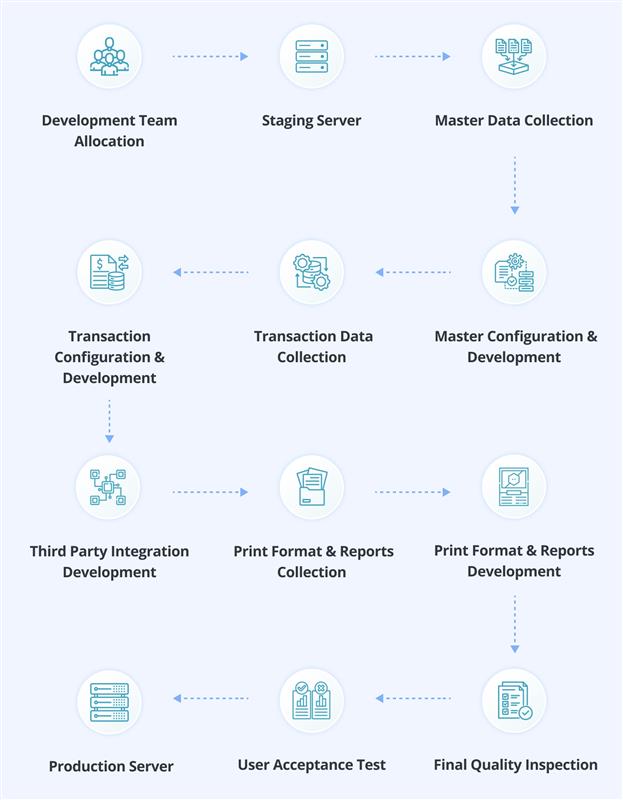
- Implementation Phase Initiation: After the completion of the Discovery Phase, the project moves to the Implementation Phase, where the project is handled by the Implementation Team along with the Principal Consultant who was involved in the discovery stage to maintain process continuity.
- Project Execution & Task Management: All implementation activities, tasks, and project milestones are managed and tracked in the Project Management System (PMS) to ensure transparency and proper progress monitoring.
- Client Communication & Progress Review: The Implementation Project Manager conducts weekly meetings with the client to review progress, discuss updates, and address any implementation-related queries.
- Data Migration & Testing: Once the system configuration and development activities are completed, the project moves to Data Migration and User Acceptance Testing (UAT) to validate the system with real business data.
- Pilot Go-Live & Final Go-Live: After successful UAT, the system is deployed in Pilot Go-Live for controlled testing, followed by Final Go-Live in the production environment.
Development Process Standards:
1.1 Team Allocation & Ownership
A dedicated implementation team is assigned at the start of every project. Each team member has clearly defined roles, responsibilities, and module ownership to ensure accountability throughout the project lifecycle
Role
Responsibilities
Ownership
Tech Lead
Architecture decisions, code reviews, PR approvals, sprint planning, client technical calls
Overall technical delivery and quality
Tech Lead
Responsibilities
Architecture decisions, code reviews, PR approvals, sprint planning, client technical calls
Ownership
Overall technical delivery and quality
Backend Developer
Server-side logic, doctypes, APIs, hooks, background jobs, patches
Assigned modules and custom apps
Backend Developer
Responsibilities
Server-side logic, doctypes, APIs, hooks, background jobs, patches
Ownership
Assigned modules and custom apps
Frontend Developer
Client scripts, form customisations, print formats, portal pages, UI/UX
Assigned UI features and client-side logic
Frontend Developer
Responsibilities
Client scripts, form customisations, print formats, portal pages, UI/UX
Ownership
Assigned UI features and client-side logic
QA Engineer
Test case preparation, manual and automated testing, bug reporting, regression testing
End-to-end testing sign-off per feature
QA Engineer
Responsibilities
Test case preparation, manual and automated testing, bug reporting, regression testing
Ownership
End-to-end testing sign-off per feature
DevOps Engineer
Server provisioning, deployment pipelines, bench management, monitoring, backups
Server uptime, deployment, and infrastructure
DevOps Engineer
Responsibilities
Server provisioning, deployment pipelines, bench management, monitoring, backups
Ownership
Server uptime, deployment, and infrastructure
Principal Consultant
Requirement clarity, process alignment, client communication, UAT coordination
Business logic accuracy and client satisfaction
Principal Consultant
Responsibilities
Requirement clarity, process alignment, client communication, UAT coordination
Ownership
Business logic accuracy and client satisfaction
- Module Ownership: Each module or feature is assigned to a specific developer at sprint start. Ownership includes development, unit testing, and documentation for that module.
- Escalation Path: Developer → Tech Lead → Principal Consultant → Project Manager.
1.2 Technical Alignment with Client Requirements
Before any development starts, the technical team must align with the client’s requirements using the process documents prepared during the Discovery phase. This ensures the system is built exactly as agreed
- Document Handoff: The consulting team formally hands over the BRD, Process List, FRS, KDS, and WBS to the implementation team with a walkthrough session.
- Requirement-to-Task Breakdown: Each FRS requirement is broken down into actionable development tasks in the Project Management System with clear acceptance criteria.
- Consultant Involvement: The Principal Consultant remains available throughout development for requirement clarifications and business logic validation.
- Change Management: Any scope change after alignment must go through a formal Change Request process with client approval before implementation.
1.3 Technical Architecture Document
A Technical Architecture Document (TAD) defines the system design, app structure, API design, Git branching strategy, and environment configuration for the project.
- Standard Template: All projects use the standard TAD template as the baseline. This covers app structure, module layout, hooks configuration, naming conventions, and deployment strategy.
- Project-Specific TAD: For projects with complex integrations, custom workflows, or non-standard architecture, a project-specific TAD is created extending the standard template.
- When to Create Project-Specific TAD: Multi-app projects, third-party API integrations, custom authentication flows, non-standard deployment environments, or projects requiring microservices alongside Frappe.
- Approval: The Tech Lead prepares the TAD and it is reviewed before development begins. All team members must read and acknowledge the TAD.
1.4 Project Environment Setup
Before writing any code, the project environment must be set up with defined versions and app structure.
Step 1: Define Framework and App Versions
Component
Version (Define Per Project)
Frappe Framework
v16.x (latest stable)
ERPNext
v16.x (latest stable)
India Compliance
As per ERPNext compatibility
HRMS
As per ERPNext compatibility
Payments
As per ERPNext compatibility
LMS / Other Frappe Apps
As per project scope
Python
3.11+ (as per Frappe requirement)
Node.js
18+ / 20+ (as per Frappe requirement)
MariaDB
10.6+
Step 2: Identify and Create Custom Apps
- List all custom apps required based on the project scope and FRS.
- Follow the defined custom app naming convention: {client_prefix}_{module_name} (e.g., befree_lending, hmws_fleet).
- Use the standard app structure template for directory layout, hooks.py skeleton, and fixtures setup.
Step 3: Ownership Assignment
- Each custom app is assigned to a specific developer as the primary owner.
- The Tech Lead oversees all apps and is the final approver for merges.
1.5 Coding Standards
Every developer must read and follow the defined Coding Standards document before writing any code. The coding standards are enforced during code reviews.
Python Conventions
- snake_case for variables, functions, and file names.
- Type hints for function parameters and return values.
- Docstrings for all public functions and classes.
- Use frappe.throw() for user-facing validations, frappe.log_error() for backend errors.
JavaScript Conventions
- camelCase for variables and functions.
- Use Frappe Client API patterns: frappe.call(), frm.set_value(), frm.set_df_property().
- Never use direct DOM manipulation when a Frappe API exists.
Architecture Rules
- Server scripts over client scripts when business logic must be enforced.
- Custom app development over ERPNext core modifications (upgrade-safe approach).
- Fixtures for custom fields, property setters, and workflows.
- All business logic in controller methods (validate, before_save, on_submit), not in client scripts.
1.6 GitHub Management
All custom apps are version-controlled on GitHub with a multi-branch strategy and structured PR workflow.
Branch Strategy
Branch
Purpose
Rules
main
Production
Protected. Only TL merges from staging/develop via PR. Tagged releases (v1.0.0, v1.1.0).
main
— ProductionProtected. Only TL merges from staging/develop via PR. Tagged releases (v1.0.0, v1.1.0).
staging
Pre-production QA
Optional protected branch. Mirrors production config. Full regression testing before main merge. Can be skipped for smaller projects.
staging
— Pre-production QAOptional protected branch. Mirrors production config. Full regression testing before main merge. Can be skipped for smaller projects.
develop
Integration
Protected. All feature PRs merge here. CI runs tests on every PR. TL reviews and approves.
develop
— IntegrationProtected. All feature PRs merge here. CI runs tests on every PR. TL reviews and approves.
<devname>
Developer branch
Personal branch per developer. Frequent commits. PR into develop when feature-complete.
<devname>
— Developer branchPersonal branch per developer. Frequent commits. PR into develop when feature-complete.
hotfix/<issue>
Emergency fixes
Branched from main. Merged back to both main AND develop after fix.
hotfix/<issue>
— Emergency fixesBranched from main. Merged back to both main AND develop after fix.
PR Workflow
- Developer pushes to their personal branch and raises PR into develop.
- PR must include a clear description of changes made.
- TL reviews for code quality, adherence to architecture document, and coding standards.
- After approval, TL merges (squash merge preferred for clean history).
- All developers pull latest develop after merge to stay synchronised.
- develop → staging merge happens at sprint end or milestone completion.
- staging → main (or develop → main) merge only after QA sign-off and client UAT approval.
Commit Message Convention
Type
Example
When to Use
Feat
Feat: Add custom discount logic for bulk orders in Sales Order
New feature or functionality
Feat
— New feature or functionalityFeat: Add custom discount logic for bulk orders in Sales Order
Fix
Fix: Resolve batch qty mismatch on stock reconciliation
Bug fix
Fix
— Bug fixFix: Resolve batch qty mismatch on stock reconciliation
Chore
Chore: Update custom fields for Sales Invoice fixtures
Maintenance, dependencies, config
Chore
— Maintenance, dependencies, configChore: Update custom fields for Sales Invoice fixtures
Refactor
Refactor: Extract common validation utilities
Code restructuring without behaviour change
Refactor
— Code restructuring without behaviour changeRefactor: Extract common validation utilities
Docs
Docs: Update API documentation for payment module
Documentation changes
Docs
— Documentation changesDocs: Update API documentation for payment module
Test
Test: Add unit tests for discount calculation
Adding or updating tests
Test
— Adding or updating testsTest: Add unit tests for discount calculation
Perf
Perf: Optimise stock ledger query for large datasets
Performance improvement
Perf
— Performance improvementPerf: Optimise stock ledger query for large datasets
CI
CI: Add GitHub Actions workflow for test suite
CI/CD pipeline changes
CI
— CI/CD pipeline changesCI: Add GitHub Actions workflow for test suite
1.7 Security Guidelines
Security must be considered before and during development, not as an afterthought. Every developer must follow these guidelines.
Pre-Development Security Checklist
- Review permission model design before writing code.
- Identify all user-facing APIs and plan permission enforcement.
- Define data access boundaries per role.
Runtime Security Practices
- SQL Injection Prevention: Always use frappe.db parameterised queries. Never concatenate user input into SQL strings.
- Permission Checks: Every whitelisted API must include frappe.has_permission() or @frappe.whitelist(methods=['POST']) with explicit role checks.
- XSS Prevention: Sanitise all user inputs rendered in HTML. Use frappe.utils.escape_html() for output encoding.
- IDOR Prevention: Validate that the current user has access to the requested document before returning data.
API Security Standards
- All APIs must use @frappe.whitelist() decorator with appropriate method restrictions.
- Rate limiting must be configured for public-facing APIs.
- Input validation at the API entry point before processing.
1.8 API Development Guidelines
All custom APIs must follow a consistent design pattern for maintainability and security.
- Whitelisted API Pattern: Use @frappe.whitelist() for all client-callable methods. Place APIs in a dedicated api.py file per module.
- Request/Response Structure: Accept named parameters, validate types, return structured dict responses. Use frappe.throw() for validation errors.
- Error Handling: Wrap logic in try-except. Use frappe.throw() for expected errors (user-facing) and frappe.log_error() for unexpected exceptions.
- Authentication: All APIs enforce frappe.session.user checks. Guest APIs must be explicitly marked with allow_guest=True.
- Permission Enforcement: Check document-level and role-level permissions within the API, not just at the decorator level.
1.9 QA & Testing Standards
Every feature must pass through a defined testing process before it is considered complete.
End-to-End Testing Process
- Developer performs unit testing on their branch before raising PR.
- QA creates test cases from FRS acceptance criteria before development starts.
- After PR merge to develop, QA performs functional testing on the dev/stage server.
- Regression testing at sprint end before develop → staging merge.
- UAT with client on staging/UAT server before production deployment.
Automated Test Cases
- Use frappe.tests.utils and unittest for writing test cases.
- Every custom doctype must have at least basic CRUD test cases.
- All business logic functions must have unit tests covering happy path and edge cases.
- Run tests via: bench --site {site} run-tests --app {app_name}.
Manual QA Checklist Per Feature
- Functional correctness against FRS requirements.
- Permission checks for all defined roles.
- Error handling for invalid inputs.
- UI/UX consistency and responsiveness.
- Print format and report accuracy.
1.10 Logging, Error Handling & Patch Management
Proper logging, error handling, and patch management ensure system reliability and smooth upgrades.
Logging Standards
- Use frappe.logger() for structured logging in background jobs and long-running processes.
- Use frappe.log_error() for capturing exceptions with full traceback into the Error Log doctype.
- Never use bare print() statements in production code.
- Log meaningful context: document name, user, operation, and relevant field values.
Error Handling Practices
- All whitelisted APIs and doc_events must have try-except blocks.
- Use frappe.throw() for user-facing validation errors with clear messages.
- Use frappe.log_error() in except blocks to capture unexpected failures.
- Never use bare except: or except Exception: without logging the error.
- For background jobs: log errors and send notifications for critical failures.
Patch & Data Migration Process
- All data migrations use Frappe's patches framework: {app}/patches/{version}/patch_name.py.
- Every patch must include a clear docstring explaining what it does and why.
- Pre-patch validation: Check data state before modifying. Skip gracefully if already applied.
- Rollback strategy: Document manual rollback steps for every destructive patch.
- Post-patch verification: Run bench --site {site} migrate and verify data integrity.
- Register patches in patches.txt in the correct execution order.
1.11 Deployment Pipeline
Every project follows a structured deployment pipeline from development to production.
Stage
Server
Branch
Purpose
Internal Dev
Local / Dev server
Developer branch
Developer testing
Internal Dev
Developer branchLocal / Dev server
Developer testing
Stage
Stage server
develop
Team integration testing
Stage
developStage server
Team integration testing
UAT
UAT server
develop / staging / uat
Client acceptance testing
UAT
develop / staging / uatUAT server
Client acceptance testing
Production
Production server
main
Live deployment
Production
mainProduction server
Live deployment
- Stage and production servers are configured using the standard server setup guideline documents.
- No code is deployed to production without passing stage and UAT testing.
- Production deployments happen only after end-to-end testing sign-off from both QA and client.


